
What is Standardisation Hub?
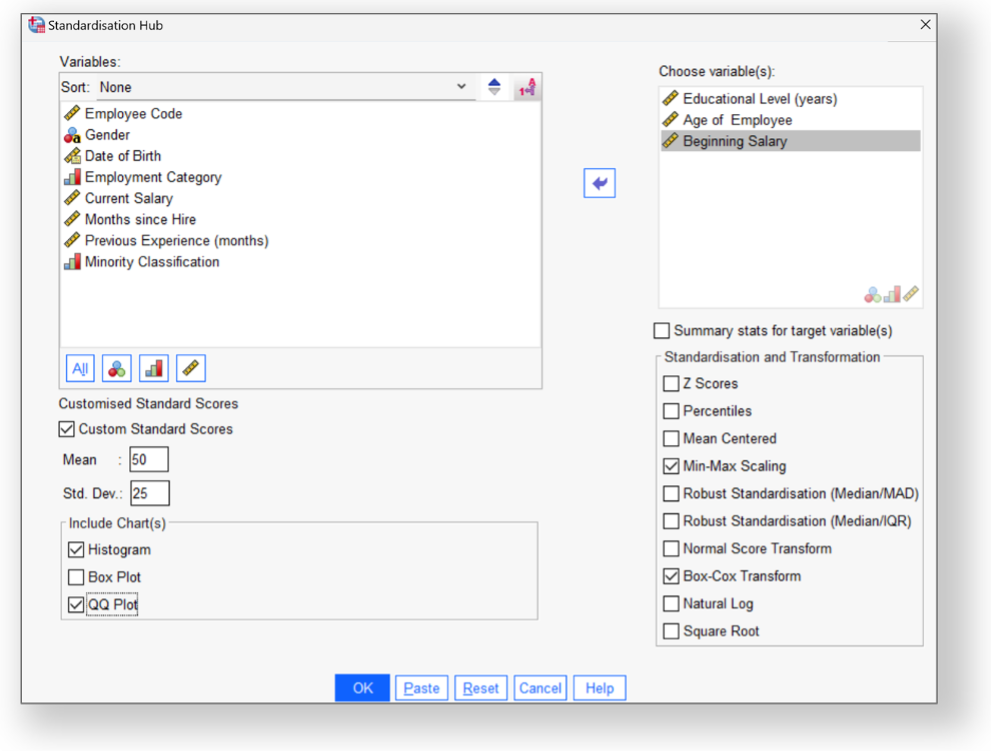
Standardisation Hub is a custom dialog and extension command for IBM SPSS Statistics that brings many common standardisation and transformation options into one dialog.
From a single dialog, you can select one or more variables and apply:
- Z-scores
- Percentile groups (1–99)
- Mean-centering
- Min–max scaling (0–1)
- Robust standardisation (median/MAD or median/IQR)
- Normal-score (Blom) transforms
- Box–Cox transforms
- Square-root and log transforms
- Custom standard scores (e.g. T-scores with your own target mean and SD)
Each method creates named new variables (e.g. Zincome, tenure_mcentre, salary_bc), with sensible labels and formats.
Built-in plots and syntax
To help visualise the newly created variables, the Standardisation Hub can also produce the following plots to illustrate the transformed target distributions.
- Histograms
- Boxplots
- Normal Q–Q plots
Furthermore, the hub will generate SPSS-like syntax based on the custom STANDARDISATION command.
Why it’s useful
- Productivity: common transforms and standardisation techniques are all available in a single location.
- Fewer mistakes: consistent naming and pre-built formulae reduce errors.
- Free and self-contained: available as a single extension bundle with its own HTML help.
If you spend any time preparing variables for regression, multilevel modelling, or assumption checks in SPSS, Standardisation Hub will undoubtedly prove to be very useful.
Installation
To use the tool, simply download the Standardisation.spe file and install it in SPSS Statistics by clicking Extensions > Install Local Extension Bundle. The new dialog will appear at the bottom of the Transform menu.